
Software
CrossOver for Mac CD Key (1 Device)
Questions before you buy?
Talk to the team if you want delivery, activation, or edition guidance before you place the order.
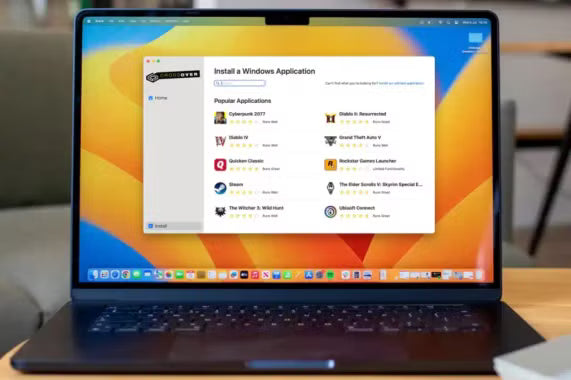
Run Windows apps on your Mac—no extra hardware, no dual-boot. The CrossOver for Mac CD Key (1 Device) unlocks a polished compatibility layer that launches many PC games and productivity tools right from macOS. Own it once and keep your favorite software within a click.
Key Features
- Full Version
- Email & phone support for 12 months
- Upgrades & bug fixes for 12 months
-
Install thousands of supported Windows apps and games with guided bottle templates
-
Launch programs directly from the Dock—no virtual machines or disk-hungry images
-
Optimize performance with DXVK, controller support, and game-focused tweaks
-
Share files, printers, and clipboard seamlessly between Windows apps and your Mac
-
Update easily with ongoing compatibility improvements included in your license
Story and Atmosphere
CrossOver feels like a bridge that disappears as soon as you cross it. You click an installer, pick a bottle, and your program appears like a native app—menus, shortcuts, and files right where you expect them. It’s an epic adventure for productivity and play: launch work tools at lunch, a quick session of a classic title after hours, and keep everything in one tidy setup. Not open-world exploration, but it opens doors that used to stay closed.
Available Platforms
Mac
Minimum Requirements
-
CPU: Modern dual-core processor
-
GPU: Integrated graphics with Metal support
-
RAM: 8 GB
-
Storage: 2–4 GB for app and bottles (more for games)
-
Internet: Required for activation and bottle dependencies
Recommended Requirements
-
CPU: Recent quad-core Apple silicon or Intel
-
GPU: Integrated or discrete graphics with strong Metal performance
-
RAM: 16 GB+
-
Storage: SSD with 20 GB+ free for apps/games
-
Internet: Stable broadband for downloads and updates
| Spec | Minimum | Recommended |
|---|---|---|
| CPU | Modern dual-core | Recent quad-core (Apple silicon or Intel) |
| GPU | Integrated (Metal support) | Integrated/discrete with strong Metal performance |
| RAM | 8 GB | 16 GB+ |
| Storage | 2–4 GB + app data | SSD, 20 GB+ free for apps/games |
| Internet | Required (activation/dependencies) | Stable broadband |
Reviews & Testimonials
“Installed my must-have Windows tools in minutes—no VM, no fuss.” — ★★★★☆ Creative Pro
“Great frame pacing on classic games; Dock launch is a joy.” — ★★★★★ Mac Gamer
“Bottle templates and quick updates keep compatibility solid.” — ★★★★☆ IT Coordinator
Activation Guide (Mac)
Download software here: https://www.codeweavers.com/crossover/download-now, then install it.
Open CrossOver and activate your key inside the software after installation.
Buy Now — get your CrossOver for Mac CD Key (Device) and run Windows apps and games on your Mac with a clean, native feel.
Technical Specs & System Requirements
| Spec | Minimum | Recommended |
|---|---|---|
| CPU | Modern dual-core | Recent quad-core (Apple silicon or Intel) |
| GPU | Integrated (Metal support) | Integrated/discrete with strong Metal performance |
| RAM | 8 GB | 16 GB+ |
| Storage | 2–4 GB + app data | SSD, 20 GB+ free for apps/games |
| Internet | Required (activation/dependencies) | Stable broadband |
Product snapshot
What you receive
- Original activation or license delivery by email after checkout.
- Download or installation guidance included whenever the product requires it.
- Order, activation, and account support available if you need help.
Buying confidence
- Checkout runs through the same NDWS Market order flow used across the catalog.
- Order, delivery, and activation questions can be handled through support if something needs attention.
- If you need the correct edition confirmed before buying, contact support first and include the product name.
Process
How digital delivery works
01 Purchase
Buy your product securely through NDWS Market checkout with fast digital order processing.
02 Download
You receive the activation key and any installation guidance by email after checkout.
03 Install
Follow the included steps to download and install the software on the correct device.
04 Activate
Enter the delivered license key to activate the product and start using it.
Compare
Why buy from NDWS Market?
| Features | NDWS Market | Others |
|---|---|---|
| Guaranteed authentic software Every key is sourced for legitimate activation and delivered through the NDWS Market order flow. | ✓ | × |
| Instant digital delivery The license key and access details are sent by email after checkout without manual chasing. | ✓ | × |
| Activation and install guidance Support can help if you need the right edition confirmed or the setup steps clarified. | ✓ | × |
| Replacement or refund path If there is a real activation issue, NDWS Market gives you a support route instead of leaving you stuck. | ✓ | × |
| Transparent checkout pricing The buying flow stays inside one storefront with visible pricing and a normal checkout experience. | ✓ | × |
| Secure encrypted payments Orders run through the same protected checkout used across the catalog, not scattered seller flows. | ✓ | × |
Support
Frequently asked questions
How do we keep our prices so low?
Digital fulfillment and volume sourcing let NDWS Market price many products below typical retail levels.
Are our codes/keys real?
Yes. NDWS Market products are sold for legitimate activation and standard digital delivery.
How long does it take to get my order?
Most orders are delivered within minutes, although verification or payment checks can occasionally add some delay.
Do we ship by post?
Software keys and digital products are delivered electronically. Physical shipping only applies when a listing clearly includes hardware.
How can I download/view my code/key?
You receive the key and any included instructions by email after checkout, so you can access the product details digitally.
Are there subscription fees for your product keys?
No recurring subscription is added unless the product itself is specifically sold as a subscription-based license.
Can I redeem/activate my product key later?
Usually yes, but activating sooner is still the safer option so you can confirm everything is working while the order is fresh.
I do not know how to activate my product key.
Use the included setup guidance first. If anything is unclear, contact support and we will help you complete the activation.
Reviews
There are no reviews yet.