
Video Games
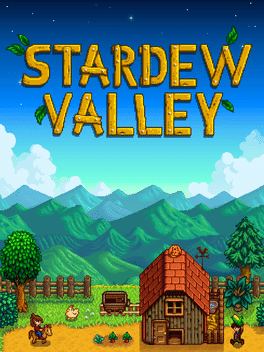
Stardew Valley Steam CD Key
Questions before you buy?
Talk to the team if you want delivery, activation, or edition guidance before you place the order.
Have you ever wondered what it’s like to run a farm with few coins? Could you maintain the homestead to live out of it? Living in the countryside is not as easy as you can imagine.
Stardew Valley is exactly about that. This video game will show you life in the country and measure if you have what it takes to prosper there.
RoyalCDKeys brings you Stardew Valley PC Steam key at the best price. Manage your farm, complete grandpa’s goals, and restore the Community Center. Browse our website to access the best prices in video games from different gaming platforms.
Get the best deals on:
- PC games.
- Nintendo games.
- PlayStation games.
- Xbox games.
We are a top seller that accepts the currency of your choice for payment matters. Our site store provides the games that other stores don’t sell, and you can get each key-code cheaper and securely.
Game information
|
Release Date |
February 2016 |
|
Publisher |
ConcernedApe |
|
Developer |
ConcernedApe |
|
Total Rating |
81% |
|
Content Rated |
E |
|
Game Modes |
Single-player Multiplayer Online cooperative |
|
Player Perspectives |
Third person |
|
Genres |
Indie |
|
Themes |
Farm, Village, Tools |
|
Platforms |
Microsoft Windows, macOS, Linux, PlayStation 4, Xbox Series One, Nintendo Switch, PlayStation Vita, iOS, Android, |
|
Sellers |
Steam, RoyalCDKeys |
Product Description
Stardew Valley takes the country life to a new level. Start a new adventure in a farm plot of a local community and rebuild your grandfather’s old farm in Stardew Valley.
Let’s put you in perspective. You have just inherited an old farm from your grandfather. Thus, you are now given a chance to start over a new life, armed with some old tools and few coins. Your task is to turn this old place into a lively, thriving farm that you can be proud of.
The game was released back in 2016, and it’s still considered one of the best farming games for PC. The vibrant hub and vibe from Stardew Valley is something difficult to replicate. ConcernedApe knows that well, and they’ve tried their best to give users a non-free game that is enjoyable to play.
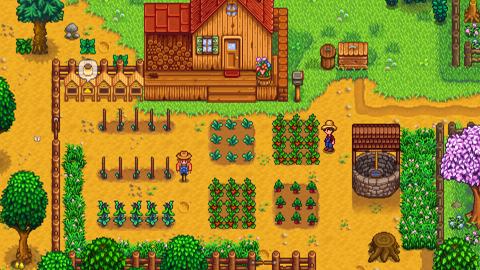
Even though Stardew Valley seems like an ordinary farm game, the truth is that you have several things to do here, allowing for many hours of gameplay with little dedication.
When you play Stardew Valley for the first time, you will have to choose a map where you will be trying to become a master farmer. Each map has its cons and pros, which are listed below:
- Hilltop Farm: This map is quite interesting. The farm’s feature is that you have several areas to raise animals. It’s a great place to start improving your mining skills and create a thriving home since it’s a spawn of rocks and ore. You can still use it to harvest crops, coops, or barns as well.
- Wilderness Farm: This is a unique type of farm with seasonal festivals. The main difference is that dangerous monsters start to spawn in the areas once the sun goes down. This is why it’s perfect to increase your combat skill. You will also find a mysterious cave and a haunted maze to explore.

- Forest Farm: This farm is focused on foraging skills. It’s great for players that want to enjoy the wilderness. You can find different forest items as well. It’s also a good option to start creating farm buildings.
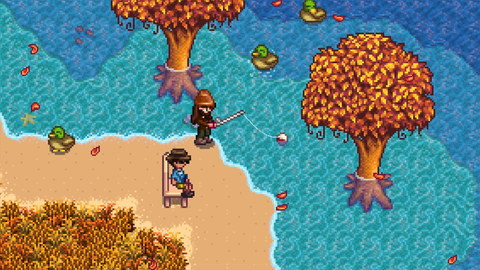
- Riverland Farm: Riverland Farm is a map with new environments that players overlook. Rivers break up this land, so the farm map is great for people who enjoy fishing. There is plenty of space to have overgrown fields and useful machines.
- Beach Farm: The beach farm is a map for extra challenges so that you can make your grandfather’s old farm plot a great place again. The beach farm has an oceanic and tropical vibe, so if you want to say “hand me down tools” to restore Stardew Valley, what’s better than a beach-like paradise?
- Standard Farm: This is the default map in Stardew Valley. It’s a large and solid piece of farmland where you can even celebrate a feast under the winter star. Even though this map doesn’t have any special quirks, like powerful weapons or something, you can still apply the old ways and build your farm from scratch. It’s a great place to grow crops.
- Four Corners: This is the newest map in the game. It’s divided into four sections connected with pathways that need upgraded tools to be cleared. This is not a place for a struggling greenhorn. It is ideal for the multiplayer mode since the map gives you your own area to start working hard in the name of your town’s benefits. New areas are still available for you to cross and have fun with your friends.
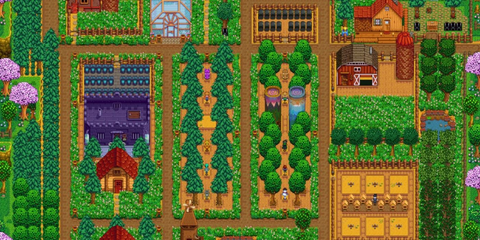
Stardew Valley allows you to begin a new adventure with new things and secrets that lie underneath and are yet to be discovered. You decide in what place of the world you want to start. The town is there to be protected and help your dreams come true.
Once you have chosen the map, you will be able to get new cooking and crafting recipes and generally progress. Remember that the map features turn your overgrown field into a thriving farm, full of life. You’ll be capable to do this only when you develop your skills to customize your business and craft/unlock better buildings, weapons, and tools.

You’re not alone on the map, so meeting new friends is part of the game. Interactions can be the push you need to boost your farm. This is why you can join forces with the Joja corporation or work by yourself.
Hardware Requirements
System Requirements on PC:
- CPU: Intel Core 2 Duo E4400 or AMD Athlon 64 X2 Dual Core 4200+.
- RAM: 2 GB.
- HDD: 500 MB of storage space.
- GPU: AMD Radeon X1900 GT or NVIDIA GeForce GT 340.
- OS: Windows Vista, Windows 7, Windows 8.1, Windows 10.
- DirectX: Version 10.
- Shader Model: 3.0+.
- Screen Resolution: 1080p.
- Network: Broadband Internet Connection.
Stardew Valley Activation Details
If you’re looking to play as soon as possible, you need to buy Stardew Valley on your PC. You will receive a Steam CD key that you need to redeem on your Steam account. Once you have purchased the game, follow these instructions to download your game:
- Open the Steam Client and log in to your Steam account. If you don’t have an account, sign up on the Steam page.

- Look at the left corner of the Steam platform and search for the “Games” menu.

- Select “Activate a Product on Steam.”

- Use the Stardew Valley Steam key that you previously got from your purchase.

- Download Stardew Valley on your PC.
Now that you have your video game in your property forever and it’s activated, you can find your game in the library or look in the categories of your account, install it and enter head on to your lively farm!
Note that you shouldn’t have any region or language restrictions when installing the game. But if you do, try using a VPN from Europe. This way, no matter where you are located, your game will be installed.
System Requirements
| Component | Requirement |
|---|---|
| Release Date | February 2016 |
| Publisher | ConcernedApe |
| Developer | ConcernedApe |
| Total Rating | 81% |
| Content Rated | E |
| Game Modes | Single-player Multiplayer Online cooperative |
| Player Perspectives | Third person |
| Genres | Indie |
| Themes | Farm, Village, Tools |
| Platforms | Microsoft Windows, macOS, Linux, PlayStation 4, Xbox Series One, Nintendo Switch, PlayStation Vita, iOS, Android, |
| Sellers | Steam, RoyalCDKeys |
Product snapshot
What you receive
- Original activation or license delivery by email after checkout.
- Download or installation guidance included whenever the product requires it.
- Order, activation, and account support available if you need help.
Buying confidence
- Checkout runs through the same NDWS Market order flow used across the catalog.
- Order, delivery, and activation questions can be handled through support if something needs attention.
- If you need the correct edition confirmed before buying, contact support first and include the product name.
Process
How digital delivery works
01 Purchase
Buy your product securely through NDWS Market checkout with fast digital order processing.
02 Download
You receive the activation key and any installation guidance by email after checkout.
03 Install
Follow the included steps to download and install the software on the correct device.
04 Activate
Enter the delivered license key to activate the product and start using it.
Compare
Why buy from NDWS Market?
| Features | NDWS Market | Others |
|---|---|---|
| Guaranteed authentic software Every key is sourced for legitimate activation and delivered through the NDWS Market order flow. | ✓ | × |
| Instant digital delivery The license key and access details are sent by email after checkout without manual chasing. | ✓ | × |
| Activation and install guidance Support can help if you need the right edition confirmed or the setup steps clarified. | ✓ | × |
| Replacement or refund path If there is a real activation issue, NDWS Market gives you a support route instead of leaving you stuck. | ✓ | × |
| Transparent checkout pricing The buying flow stays inside one storefront with visible pricing and a normal checkout experience. | ✓ | × |
| Secure encrypted payments Orders run through the same protected checkout used across the catalog, not scattered seller flows. | ✓ | × |
Support
Frequently asked questions
How do we keep our prices so low?
Digital fulfillment and volume sourcing let NDWS Market price many products below typical retail levels.
Are our codes/keys real?
Yes. NDWS Market products are sold for legitimate activation and standard digital delivery.
How long does it take to get my order?
Most orders are delivered within minutes, although verification or payment checks can occasionally add some delay.
Do we ship by post?
Software keys and digital products are delivered electronically. Physical shipping only applies when a listing clearly includes hardware.
How can I download/view my code/key?
You receive the key and any included instructions by email after checkout, so you can access the product details digitally.
Are there subscription fees for your product keys?
No recurring subscription is added unless the product itself is specifically sold as a subscription-based license.
Can I redeem/activate my product key later?
Usually yes, but activating sooner is still the safer option so you can confirm everything is working while the order is fresh.
I do not know how to activate my product key.
Use the included setup guidance first. If anything is unclear, contact support and we will help you complete the activation.




Reviews
There are no reviews yet.