
Video Games
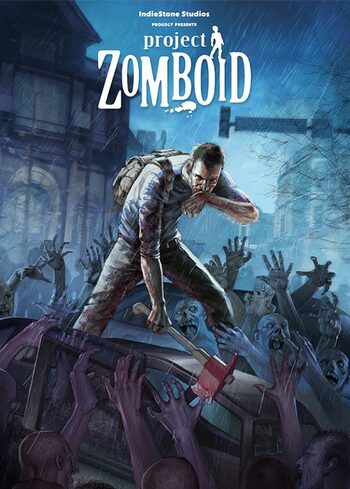
Project Zomboid Steam CD Key
Questions before you buy?
Talk to the team if you want delivery, activation, or edition guidance before you place the order.

Loot houses, build defenses, and try to survive by your own cunning against the relentless horde! Download Project Zomboid and try to make it on persistent, player run servers! Your continued survival relies on how well you can gather resources before inevitable death day.
- Play Project Zomboid with friends on a vast and growing map with split screen or online.
- Project Zomboid has amazing atmospheric music tracks that make this realistic survival even more immersive.
- With great character customization, many fun ways to play like Last Stand Mode – it is a must-play for all you zombie survival enthusiasts!
Let’s check what else makes this game so enjoyable!
Game Information
|
Release Date |
April 25, 2011 |
|
Developer |
The Indie Stone |
|
Publisher |
The Indie Stone |
|
Total Rating |
TBA |
|
Content Rated |
None/Problably M |
|
Game Modes |
Single-player, multiplayer |
|
Player Perspectives |
Isometric |
|
Genres |
Role-playing, survival horror |
|
Themes |
Zombies, Apocalypse, Survival |
|
Platforms |
Java Microsoft Windows OS X Linux
|
Gameplay and Mechanics

Project Zomboid is an interesting concept that takes us back to 2011 when it was first released. It is an open-ended survival sandbox game in which you will definitely die. It just depends on when.
Players fight with or against each other to achieve the longest survival run possible! Let’s find out what are some of the mechanics and gameplay that have made this game popular for so many years since the release.
Create Your Own Experience

Why has this game had such a long run? Fans say it’s due to the ability to create your own experience. Among the maps, you can choose Muldraugh and West Point (if you wish) or create your own map using tools provided by the game developers.
Also, there is a lot of crafting. Use tools, items and make weapons or barricades! You can even create a zombie-proof fort with wood you’ve gathered from the trees.
There is also a developed character customization mode, where you can choose how they look, their sex, and even an occupation that can impact the game! Do whatever you like in this amazing sandbox survival!
Amazing Multiplayer

The other great feature of this game is the multiplayer mode. Whether you want to play with friends in a local 4 player split-screen co-op mode or join the bigger arena of zombie survival – you can definitely do it!
With persistent player run servers, amazing maps, and community – you can really experience what it’s like to live during a zombie apocalypse. The gameplay may differ depending on the server that you’re in!
In the standard version of events (if the zombie apocalypse could be a “normal event”), you get slow zombies that can’t run. However – it’s not like it cannot be changed. Watch out for these Usain Bolt-like zombies! You’ll never know what you gonna get in Project Zomboid!
Realistic Survival

With Project Zomboid, you’ll truly experience how the surviving zombies would feel. Creators mastered making a real and frightening experience that is on par with what would happen in real life.
There is a full line of sight system with really great sound and vision mechanics. Be quiet at the night, turn the lights off, and loot during the day. Remember – nature doesn’t just stay there. Winter draws in, everything gets covered in grass, and hey – you are not made of stone as well!
Your character suffers during this time, and it impacts your experience. You have to deal with depression, hunger, and illnesses while trying to survive. Realistic gameplay mechanics where you can build zombie-proof forts and craft weapons is something to look forward to!
Game Modes

There are many ways to experience the apocalypse in Project Zomboid. Make sure to check them all out!
Apocalypse
It’s the default mode if you’re building the sandbox. There is not a lot of loot to get, and zombies are rather to be avoided than confronted. Also – you don’t have access to the minimap, like in the other modes.
Survivor
There is more combat action than in Apocalypse, with weaker zombies that cannot as easily drag down the players. You can also hit multiple enemies with one swing, and they have decreased rear vulnerability.

Builder
If you are not really into this whole – OMG THEY’RE COMING – kind of gameplay, you can always check out the builder mode. There is a lot of building, farming, looting, fewer zombies to kill. It’s about one-fifth of those in standard mode and just weaker in general.
Custom Sandbox
It’s “do as you please” kind of game. You can choose the options that are interesting to you, selecting from the Saved Presets. In Custom Sandbox, you are the Deus Architect, and it is up to you what kind of zombie apocalypse you want to experience.
Last Stand
As you’ve probably guessed – the last one standing wins! You have hordes and hordes of zombies in-game, and you just need to survive. It’s a vast map, but you will definitely be found, so just delay the death as long as you can.
Windows:
- OS: Windows 10, 64 Bit
- 64bit OS required
- Processor: Intel 2.77GHz Quad-core
- Memory: 8Gb Ram
- Hard Disk Space: 5gig
- Video Card: Dedicated graphics card with 2 GB of RAM minimum, OpenGL 2.1 and GLSL 1.2 support (generally 2012 or newer)
- Sound: FMOD compatible sound card
macOS:
- OS: OS X 10.7.3, or later.
- Processor: Intel 2.77GHz Quad-core
- 64bit OS required
- Memory: 8Gb Ram
- Hard Disk Space: 5gig
- Video Card: Dedicated graphics card with 2 GB of RAM minimum, OpenGL 2.1 and GLSL 1.2 support (generally 2012 or newer)
- Sound: FMOD compatible sound card
SteamOs + Linux:
- Processor: Intel 2.77GHz Quad-core
- Ubuntu LTS 16.04/Steam Machine. Requires Libgcc 6 or higher
- Memory: 8Gb Ram
- Hard Disk Space: 5gig
- Video Card: Dedicated graphics card with 2 GB of RAM minimum, OpenGL 2.1 and GLSL 1.2 support (generally 2012 or newer)
- Sound: FMOD compatible sound card
Why Buy Project Zomboid Steam Key Global CD Key on RoyalCDKeys?
At RoyalCDKeys, we believe that gamers should have access, using our services, to top game keys without spending a lot of money. That said, we offer the best deals among third-party sellers. Our stock includes Steam, Epic Games, Battle.net CD Keys, and way more!
- Suppose you compare prices between our Project Zomboid steam key and other games from Epic Games store or other publishers. In that case, you will find out that Project Zomboid is one of the best steam CD keys for a gift for Valentine’s, Christmas or a Baby Shower for a dad with very specific interests.
- RoyalCDKeys provides the best all-new CD keys for either single-player or multiplayer games for Xbox. We can’t give you free game or free steam keys, but you can be sure that it is a great price compared to the official stores. Best prices for the best customers!
- From time to time, we also share discount codes on social media giveaways, so you can discover the most incredible PC games at the best price while using preferred currency and payment methods to ensure safe transactions.
Please check if your product is free of any language or region restrictions.
The following game is sold as a redeemable Product Key and cannot be converted into a Steam Gift Card.
Activation Details for Your Steam Account
Project Zomboid Steam CD Key Global can be activated on the Steam platform in an easy and reliable process. The first thing you need to do is head to the Steam website. This is an official and legitimate method of activating your keys purchased via RoyalCDKeys.
- Once you are on the Steam website, install the Steam client on your computer.

- Install the client, and create or access your Steam account.
- Once you’re inside, click ‘Add a Game’ located in the bottom left corner.

- Next, select ‘Activate a Product on Steam.’

- Then, follow the instructions until you see the window below.

- Now, enter the product code of Project Zomboid PC Steam CD key and add it to your Steam library.
System Requirements
| Component | Requirement |
|---|---|
| Release Date | April 25, 2011 |
| Developer | The Indie Stone |
| Publisher | The Indie Stone |
| Total Rating | TBA |
| Content Rated | None/Problably M |
| Game Modes | Single-player, multiplayer |
| Player Perspectives | Isometric |
| Genres | Role-playing, survival horror |
| Themes | Zombies, Apocalypse, Survival |
| Platforms | Java Microsoft Windows OS X Linux |
Product snapshot
What you receive
- Original activation or license delivery by email after checkout.
- Download or installation guidance included whenever the product requires it.
- Order, activation, and account support available if you need help.
Buying confidence
- Checkout runs through the same NDWS Market order flow used across the catalog.
- Order, delivery, and activation questions can be handled through support if something needs attention.
- If you need the correct edition confirmed before buying, contact support first and include the product name.
Process
How digital delivery works
01 Purchase
Buy your product securely through NDWS Market checkout with fast digital order processing.
02 Download
You receive the activation key and any installation guidance by email after checkout.
03 Install
Follow the included steps to download and install the software on the correct device.
04 Activate
Enter the delivered license key to activate the product and start using it.
Compare
Why buy from NDWS Market?
| Features | NDWS Market | Others |
|---|---|---|
| Guaranteed authentic software Every key is sourced for legitimate activation and delivered through the NDWS Market order flow. | ✓ | × |
| Instant digital delivery The license key and access details are sent by email after checkout without manual chasing. | ✓ | × |
| Activation and install guidance Support can help if you need the right edition confirmed or the setup steps clarified. | ✓ | × |
| Replacement or refund path If there is a real activation issue, NDWS Market gives you a support route instead of leaving you stuck. | ✓ | × |
| Transparent checkout pricing The buying flow stays inside one storefront with visible pricing and a normal checkout experience. | ✓ | × |
| Secure encrypted payments Orders run through the same protected checkout used across the catalog, not scattered seller flows. | ✓ | × |
Support
Frequently asked questions
How do we keep our prices so low?
Digital fulfillment and volume sourcing let NDWS Market price many products below typical retail levels.
Are our codes/keys real?
Yes. NDWS Market products are sold for legitimate activation and standard digital delivery.
How long does it take to get my order?
Most orders are delivered within minutes, although verification or payment checks can occasionally add some delay.
Do we ship by post?
Software keys and digital products are delivered electronically. Physical shipping only applies when a listing clearly includes hardware.
How can I download/view my code/key?
You receive the key and any included instructions by email after checkout, so you can access the product details digitally.
Are there subscription fees for your product keys?
No recurring subscription is added unless the product itself is specifically sold as a subscription-based license.
Can I redeem/activate my product key later?
Usually yes, but activating sooner is still the safer option so you can confirm everything is working while the order is fresh.
I do not know how to activate my product key.
Use the included setup guidance first. If anything is unclear, contact support and we will help you complete the activation.


Reviews
There are no reviews yet.