
Video Games
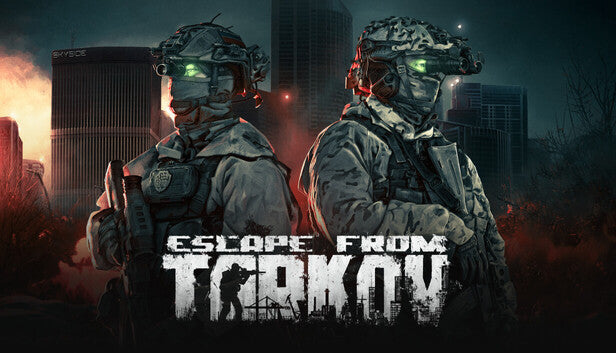
Escape from Tarkov: Standard Edition PC Steam Account
Questions before you buy?
Talk to the team if you want delivery, activation, or edition guidance before you place the order.
No mini-map, no mercy, no second chances. Escape from Tarkov: Standard Edition throws you into a brutal extraction shooter where every raid is a gamble with your entire stash. With this PC Steam account you get the Standard Edition ready to play—log in, install, and hit your first raid at a cheap price instead of paying full storefront cost.
Key Features
-
Hardcore extraction shooter gameplay
Enter raids, grab loot, and fight your way to extraction. If you die, you lose almost everything you brought—gear, guns, meds, ammo, all gone. Survive, and you grow stronger and richer after every run. -
Two main ways to play: PMC and Scav
Run as your main PMC with your own loadout, or jump in as a Scav with random gear and lower risk. Use Scav runs to rebuild after bad raids or to feed your stash without burning through expensive kits. -
Realistic gunplay and ballistics
Tune your weapons with hundreds of parts, ammo types, and attachments. Recoil, armor class, and penetration all matter—this is mil-sim style gunplay where knowledge and preparation hit just as hard as your aim. -
Large, interconnected maps
Factory, Customs, Woods, Shoreline, Interchange, Reserve, Lighthouse, Streets of Tarkov and more—each with unique extraction points, loot routes, and AI threats. Learning the terrain is half the fight. -
Persistent stash and hideout
Upgrade your hideout to boost healing, stash size, crafting, and passive income. Your decisions between raids are just as important as your split-second choices inside them. -
Squad up or go solo
Stack with friends for coordinated pushes and callouts, or roam alone for maximum stealth and tension. Tarkov lets you decide how loud or quiet you want your raids to be.
What It Feels Like
Tarkov feels less like a “match” and more like a high-stakes burglary where everything can go wrong. Footsteps above you get your heart racing. A single unsilenced shot can flip the whole map into chaos. You creep through hallways listening for metal clanks, cloth rustles, and distant gunfire, knowing one bad peek can erase an hour of looting.
Extracting with a backpack full of rare ammo, high-tier armor, and quest items feels incredible—because you know how easily it could have gone the other way. When you finally make it out, limping, bleeding, out of meds, your reward is not just loot but stories: the ambush you survived, the squad you wiped, the one sound that gave your enemy away.
Technical Specs & System Requirements
(Specs below are simplified and do not include OS details.)
Available Platforms
-
PC (Steam)
Minimum Requirements
-
CPU: AMD Ryzen 5 3600 or similar
-
GPU: GTX 1660 or similar
-
RAM: 16 GB
-
Storage: 80 GB available space
Recommended Requirements
-
CPU: Intel Core i7-14700F or better
-
GPU: RTX 4070 or similar
-
RAM: 64 GB
-
Storage: 80 GB on SSD for smoother loading
Quick Spec Table
Spec – Minimum – Recommended
CPU – Ryzen 5 3600 or similar – Intel i7-14700F or better
GPU – GTX 1660 or similar – RTX 4070 or similar
RAM – 16 GB – 64 GB
Storage – 80 GB HDD/SSD – 80 GB SSD
Activation Guide (Steam Account)
-
Download and install the Steam client on your PC.
-
Log out of any existing Steam account.
-
Log in using the PC Steam account credentials provided with your Escape from Tarkov: Standard Edition purchase.
-
Open the LIBRARY tab and confirm that Escape from Tarkov appears in the games list.
-
Click the game, then select Install and wait for the download to finish.
-
Launch the game from Steam and complete any first-time setup steps.
-
Secure the account by following your store’s instructions (for example changing password and enabling Steam Guard).
Product snapshot
What you receive
- Original activation or license delivery by email after checkout.
- Download or installation guidance included whenever the product requires it.
- Order, activation, and account support available if you need help.
Buying confidence
- Checkout runs through the same NDWS Market order flow used across the catalog.
- Order, delivery, and activation questions can be handled through support if something needs attention.
- If you need the correct edition confirmed before buying, contact support first and include the product name.
Process
How digital delivery works
01 Purchase
Buy your product securely through NDWS Market checkout with fast digital order processing.
02 Download
You receive the activation key and any installation guidance by email after checkout.
03 Install
Follow the included steps to download and install the software on the correct device.
04 Activate
Enter the delivered license key to activate the product and start using it.
Compare
Why buy from NDWS Market?
| Features | NDWS Market | Others |
|---|---|---|
| Guaranteed authentic software Every key is sourced for legitimate activation and delivered through the NDWS Market order flow. | ✓ | × |
| Instant digital delivery The license key and access details are sent by email after checkout without manual chasing. | ✓ | × |
| Activation and install guidance Support can help if you need the right edition confirmed or the setup steps clarified. | ✓ | × |
| Replacement or refund path If there is a real activation issue, NDWS Market gives you a support route instead of leaving you stuck. | ✓ | × |
| Transparent checkout pricing The buying flow stays inside one storefront with visible pricing and a normal checkout experience. | ✓ | × |
| Secure encrypted payments Orders run through the same protected checkout used across the catalog, not scattered seller flows. | ✓ | × |
Support
Frequently asked questions
How do we keep our prices so low?
Digital fulfillment and volume sourcing let NDWS Market price many products below typical retail levels.
Are our codes/keys real?
Yes. NDWS Market products are sold for legitimate activation and standard digital delivery.
How long does it take to get my order?
Most orders are delivered within minutes, although verification or payment checks can occasionally add some delay.
Do we ship by post?
Software keys and digital products are delivered electronically. Physical shipping only applies when a listing clearly includes hardware.
How can I download/view my code/key?
You receive the key and any included instructions by email after checkout, so you can access the product details digitally.
Are there subscription fees for your product keys?
No recurring subscription is added unless the product itself is specifically sold as a subscription-based license.
Can I redeem/activate my product key later?
Usually yes, but activating sooner is still the safer option so you can confirm everything is working while the order is fresh.
I do not know how to activate my product key.
Use the included setup guidance first. If anything is unclear, contact support and we will help you complete the activation.


Reviews
There are no reviews yet.